Mobaxter Alternate Download Windows 10 Mobaxter Alternate Download Windows 10
Total Page:16
File Type:pdf, Size:1020Kb
Load more
Recommended publications
-
Fira Code: Monospaced Font with Programming Ligatures
Personal Open source Business Explore Pricing Blog Support This repository Sign in Sign up tonsky / FiraCode Watch 282 Star 9,014 Fork 255 Code Issues 74 Pull requests 1 Projects 0 Wiki Pulse Graphs Monospaced font with programming ligatures 145 commits 1 branch 15 releases 32 contributors OFL-1.1 master New pull request Find file Clone or download lf- committed with tonsky Add mintty to the ligatures-unsupported list (#284) Latest commit d7dbc2d 16 days ago distr Version 1.203 (added `__`, closes #120) a month ago showcases Version 1.203 (added `__`, closes #120) a month ago .gitignore - Removed `!!!` `???` `;;;` `&&&` `|||` `=~` (closes #167) `~~~` `%%%` 3 months ago FiraCode.glyphs Version 1.203 (added `__`, closes #120) a month ago LICENSE version 0.6 a year ago README.md Add mintty to the ligatures-unsupported list (#284) 16 days ago gen_calt.clj Removed `/**` `**/` and disabled ligatures for `/*/` `*/*` sequences … 2 months ago release.sh removed Retina weight from webfonts 3 months ago README.md Fira Code: monospaced font with programming ligatures Problem Programmers use a lot of symbols, often encoded with several characters. For the human brain, sequences like -> , <= or := are single logical tokens, even if they take two or three characters on the screen. Your eye spends a non-zero amount of energy to scan, parse and join multiple characters into a single logical one. Ideally, all programming languages should be designed with full-fledged Unicode symbols for operators, but that’s not the case yet. Solution Download v1.203 · How to install · News & updates Fira Code is an extension of the Fira Mono font containing a set of ligatures for common programming multi-character combinations. -
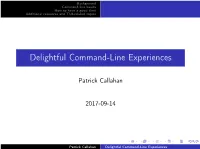
Delightful Command-Line Experiences
Background Command-line basics How to have a good time Additional resources and TUI-related topics Delightful Command-Line Experiences Patrick Callahan 2017-09-14 Patrick Callahan Delightful Command-Line Experiences Background Command-line basics How to have a good time Additional resources and TUI-related topics Outline 1 Background About this talk Why use a command-line or textual user interface? 2 Command-line basics What (together) comprise a complete command-line environment? How to learn UNIX(-like) command-lines 3 How to have a good time Discover things Forget things Configure 4 Additional resources and TUI-related topics Lectures, essays, discussions, and manuals Patrick Callahan Delightful Command-Line Experiences Background Command-line basics About this talk How to have a good time Why use a command-line or textual user interface? Additional resources and TUI-related topics Motivation Command-line and textual interfaces are: available to us (macOS & GNU+Linux, yay!) required of us by some of our tools widely varied highly customizable often terrible but they don’t have to be! So why not have an experience that’s actually pleasant? Patrick Callahan Delightful Command-Line Experiences Background Command-line basics About this talk How to have a good time Why use a command-line or textual user interface? Additional resources and TUI-related topics Purpose My hope is that this talk will encourage you to get comfy with a CLI environment that suits you provoke you to teach or correct me help me get better at doing this Patrick Callahan -

Towards Left Duff S Mdbg Holt Winters Gai Incl Tax Drupal Fapi Icici
jimportneoneo_clienterrorentitynotfoundrelatedtonoeneo_j_sdn neo_j_traversalcyperneo_jclientpy_neo_neo_jneo_jphpgraphesrelsjshelltraverserwritebatchtransactioneventhandlerbatchinsertereverymangraphenedbgraphdatabaseserviceneo_j_communityjconfigurationjserverstartnodenotintransactionexceptionrest_graphdbneographytransactionfailureexceptionrelationshipentityneo_j_ogmsdnwrappingneoserverbootstrappergraphrepositoryneo_j_graphdbnodeentityembeddedgraphdatabaseneo_jtemplate neo_j_spatialcypher_neo_jneo_j_cyphercypher_querynoe_jcypherneo_jrestclientpy_neoallshortestpathscypher_querieslinkuriousneoclipseexecutionresultbatch_importerwebadmingraphdatabasetimetreegraphawarerelatedtoviacypherqueryrecorelationshiptypespringrestgraphdatabaseflockdbneomodelneo_j_rbshortpathpersistable withindistancegraphdbneo_jneo_j_webadminmiddle_ground_betweenanormcypher materialised handaling hinted finds_nothingbulbsbulbflowrexprorexster cayleygremlintitandborient_dbaurelius tinkerpoptitan_cassandratitan_graph_dbtitan_graphorientdbtitan rexter enough_ram arangotinkerpop_gremlinpyorientlinkset arangodb_graphfoxxodocumentarangodborientjssails_orientdborientgraphexectedbaasbox spark_javarddrddsunpersist asigned aql fetchplanoriento bsonobjectpyspark_rddrddmatrixfactorizationmodelresultiterablemlibpushdownlineage transforamtionspark_rddpairrddreducebykeymappartitionstakeorderedrowmatrixpair_rddblockmanagerlinearregressionwithsgddstreamsencouter fieldtypes spark_dataframejavarddgroupbykeyorg_apache_spark_rddlabeledpointdatabricksaggregatebykeyjavasparkcontextsaveastextfilejavapairdstreamcombinebykeysparkcontext_textfilejavadstreammappartitionswithindexupdatestatebykeyreducebykeyandwindowrepartitioning -
Mastering EOS Release 1.0
Mastering EOS Release 1.0 Sean Fisk and Ira Woodring May 12, 2015 CONTENTS 1 Introduction 3 1.1 Physical Access (Keycards) ....................................... 3 1.2 Computer Access (Credentials) ..................................... 3 2 Rules and Procedures 5 2.1 Disk Space ................................................ 5 2.2 Copyrighted Material ........................................... 5 2.3 Food and Drink .............................................. 6 2.4 Overnight Parking ............................................ 6 2.5 Living in the Lab ............................................. 6 2.6 Malicious Activity ............................................ 6 2.7 Games .................................................. 6 3 Using the Command Line 7 3.1 Command-Line Basics .......................................... 7 3.2 Available Shells ............................................. 7 3.3 Interactive Shell Use ........................................... 10 3.4 Shell Scripting .............................................. 24 4 Remote Access (SSH/VNC) 27 4.1 Inter-EOS SSH .............................................. 27 4.2 Microsoft Windows ........................................... 28 4.3 Mac OS X ................................................ 36 4.4 GNU/Linux ................................................ 49 5 User-level Software Installation 65 5.1 The Standard Hierarchy ......................................... 65 5.2 Manual Installation ............................................ 66 5.3 Linuxbrew ............................................... -
ANSI Escape Code - Wikipedia
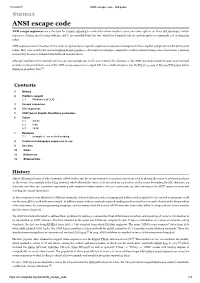
11/12/2017 ANSI escape code - Wikipedia ANSI escape code ANSI escape sequences are a standard for in-band signaling to control the cursor location, color, and other options on video text terminals. Certain sequences of bytes, most starting with Esc and '[', are embedded into the text, which the terminal looks for and interprets as commands, not as character codes. ANSI sequences were introduced in the 1970s to replace vendor-specific sequences and became widespread in the computer equipment market by the early 1980s. They were used by the nascent bulletin board systems to offer improved displays compared to earlier systems lacking cursor movement, a primary reasons they became a standard adopted by all manufacturers. Although hardware text terminals have become increasingly rare in the 21st century, the relevance of the ANSI standard persists because most terminal emulators interpret at least some of the ANSI escape sequences in output text. One notable exception was the Win32 console of Microsoft Windows before Windows 10 update TH2.[1] Contents 1 History 2 Platform support 2.1 Windows and DOS 3 Escape sequences 4 CSI sequences 5 SGR (Select Graphic Rendition) parameters 6 Colors 6.1 3/4 bit 6.2 8-bit 6.3 24-bit 7 Examples 7.1 Example of use in shell scripting 8 Invalid and ambiguous sequences in use 9 See also 10 Notes 11 References 12 External links History Almost all manufacturers of video terminals added vendor-specific escape sequences to perform operations such as placing the cursor at arbitrary positions on the screen. One example is the VT52 terminal, which allowed the cursor to be placed at an x,y location on the screen by sending the ESC character, a y character, and then two characters representing with numerical values equal to the x,y location plus 32 (thus starting at the ASCII space character and avoiding the control characters). -

Download Mintty for Windows 10 Mintty
download mintty for windows 10 mintty. Replace PuTTY with this terminal emulator for Cygwin that features a Windows user interface without requiring any display server. mintty is a lightweight, portable application that was developed so that it can replace PuTTY by serving you as a terminal emulator for Cygwin (the Unix-like environment for Windows operating systems) on your computer. This tool was designed to help seasoned computer users such as software developers, coders and programmers get the most out of their setup. It is worth mentioning that, in a similar manner to other pty-based Cygwin terminals, this application cannot possibly server as a complete replacement for Windows' native Command Prompt utility and can only serves some specific purposes. mintty comes with a native Windows user interface and does not require a display server to run on the target computer. More so, the terminal emulation of this application aims to be compatible with xterm, which is an improvement from the terminal emulation and Windows frontend components of PuTTY. The processes running within mintty communicate with the help of the POSIX API (which is provided by Cygwin), while the user interface is implemented making use of the Windows API. It provides users with a whole bunch of cool features such as 256-colour and True-Colour support, wide range of character encoding support, Emoji support, alternative fonts, colour schemes, drag & drop capabilities as well as virtual tabs. mintty. mintty Alternative – So many alternatives app to mintty that you must know. At here you can find the best replacement app for mintty. -
PS Package Management Packages 24-APR-2016 Page 1 Acmesharp-Posh-All 0.8.1.0 Chocolatey Powershell Module to Talk to Let's Encrypt CA and Other ACME Serve
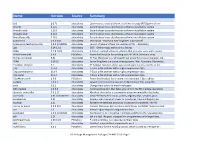
Name Version Source Summary ---- ------- ------ ------- 0ad 0.0.20 chocolatey Open-source, cross-platform, real-time strategy (RTS) game of anci... 0install 2.10.0 chocolatey Decentralised cross-distribution software installation system 0install.install 2.10.0 chocolatey Decentralised cross-distribution software installation system 0install.install 2.10.0 chocolatey Decentralised cross-distribution software installation system 0install.portable 2.10.0 chocolatey Decentralised cross-distribution software installation system 1password 4.6.0.603 chocolatey 1Password - Have you ever forgotten a password? 1password-desktoplauncher 1.0.0.20150826 chocolatey Launch 1Password from the desktop (CTRL + Backslash). 2gis 3.14.12.0 chocolatey 2GIS - Offline maps and business listings 360ts 5.2.0.1074 chocolatey A feature-packed software solution that provides users with a powe... 3PAR-Powershell 0.4.0 PSGallery Powershell module for working with HP 3PAR StoreServ array 4t-tray-minimizer 5.52 chocolatey 4t Tray Minimizer is a lightweight but powerful window manager, wh... 7KAA 2.14.15 chocolatey Seven Kingdoms is a classic strategy game. War, Economy, Diplomacy... 7-taskbar-tweaker 5.1 chocolatey 7+ Taskbar Tweaker allows you to configure various aspects of the ... 7zip 15.14 chocolatey 7-Zip is a file archiver with a high compression ratio. 7zip.commandline 15.14 chocolatey 7-Zip is a file archiver with a high compression ratio. 7zip.install 15.14 chocolatey 7-Zip is a file archiver with a high compression ratio. 7Zip4Powershell 1.3.0 PSGallery Powershell module for creating and extracting 7-Zip archives aacgain 1.9.0.2 chocolatey aacgain normalizes the volume of digital music files using the..